Ghost Audio · Auto Gain-Staging · VST3 / AU

SPIRIT LEVEL

Set-and-forget loudness leveling. Drop it on any track, tell it a target, and it rides the gain to hold you there — measuring the way your ears do, and freezing the moment the sound stops. Two knobs. No automation lanes. No babysitting.

Get Spirit Level — Free How it works
Mac only · AU / VST3 · Free forever, no card · Windows coming soon
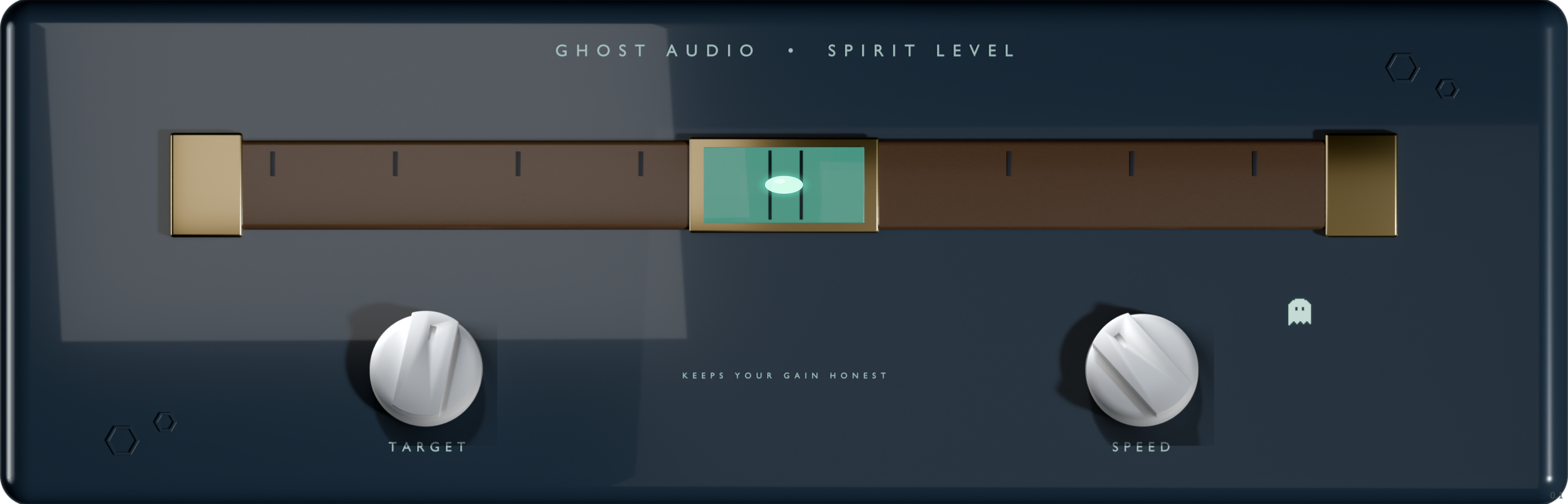
Spirit Level plugin window — spirit-level vial with a live bubble, TARGET and SPEED knobs

The whole interface. The bubble floats toward center as the level settles on target.

You have two jobs.
Neither of them is riding a fader.

Spirit Level watches your loudness with a K-weighted meter — the same weighting broadcast and streaming use, so bass and rumble can't fool it into thinking you're louder than you are. When you drift from your target, it slews the gain back. When the sound stops, it stops. You set two things and walk away.

Knob one

TARGET

−30 dB to −8 dB · default −18 dB

The loudness you want held. Spirit Level measures the short-term level against it and closes the gap — up to 12 dB of correction, so a track that wanders stays put without you drawing a single automation point.

Knob two

SPEED

Lock → fast · slew in dB per second

How quickly it corrects. Turn it up and it chases; turn it down and it eases. Bottom of the travel is LOCK — it learns your level, then freezes so you can A/B the ride honestly instead of hearing it move under you.

A leveler that knows the difference
between quiet and finished.

Most auto-gain plugins hear a fade-out and yank it back up to target — because a dumb meter can't tell a quiet passage from a mistake. Spirit Level was built around that exact problem. It measures like a mastering meter, only rides when you're genuinely near target, and freezes the instant the program stops.

K

K-weighted measurement

A 60 Hz high-pass and a 1.68 kHz shelf, summed across channels per ITU BS.1770 — the broadcast standard. Bass energy stops lying to the meter, so the level it holds is the level you actually hear.

3s

Short-term, not twitchy

Correction reads a 3-second window, so individual syllables and drum hits don't get chased. It levels the performance, not every transient inside it.

Freeze on silence

A gate opens at −50 dB and closes at −54, with a 300 ms hold before corrections resume. Silence and fades freeze the ride in place — no pumping the room tone up between phrases, no swelling the tail of a fade.

±10

Capture range that respects intent

It only rides while you're within ±10 dB of target (releasing at 14, with hysteresis). A −50 dB intro is program, not drift — so a deliberately quiet passage is left exactly as quiet as you wrote it.

Honest bypass

Flip it off and the learned gain drifts smoothly back to unity, so re-enabling never snaps the level by 12 dB. A/B without the jump scare.

The vial tells you everything

A live bubble floats toward center as your level settles on target, drifts off when you wander. One glance says whether it's riding, holding, or frozen — no menus, no meters to decode.

Controls Target · Speed Formats VST3 · AU OS macOS (Windows coming soon) Metering K-weighted, BS.1770 Correction up to ±12 dB Renders resume settled — no cold-start pump
Where to reach for it

Set it. Forget it. Come back to a level track.

Uneven vocal takes that won't sit still. A podcast guest who leans in and out of the mic. A bus that drifts loud on the choruses. A reference-loudness stage before the limiter so you're feeding it something consistent. Anywhere you'd normally draw ten minutes of gain automation, drop Spirit Level instead and get back to the music.

Compatible With Any DAW

AU + VST3 — drop it in and go. If your DAW loads plugins, it loads this one.

Ableton Live
Ableton Live
Logic Pro
Logic Pro
FL Studio
FL Studio
Fender Studio Pro
Fender Studio Pro
Cubase
Cubase
Reaper
Reaper
GarageBand
GarageBand
macOS · AU / VST3 · Does not work in Pro Tools (Pro Tools only loads AAX, and there is no AAX build).
A note on "free"

Free the way your DAW understands the word.

Spirit Level is free. Not a 10-day trial that bills you $29 a month when you forget. Not a crippled teaser with the good bits locked. The full plugin — every feature on this page — for the cost of an email address. No card, no dongle, no account to babysit. Free forever, not free-for-now.

Free · full plugin · no card

Type your email. Get the plugin.

We'll send your download link and a heads-up when the Windows build lands. No spam — we make plugins, not newsletters.

Want the paid pedals too? The whole Ghost Audio catalog is $149.99 for life ($100 during launch). Spirit Level stays free either way.

Questions, answered.

Is it really free? What's the catch?

Really free. Full plugin, no trial timer, no locked features. Type your email, get the download. The only ask is that email so we can send the file and tell you when the Windows build is ready. That's the whole deal.

What does it actually do?

It rides your gain to hold a loudness target you set — measuring with a K-weighted meter so it hears the way broadcast and streaming do. Set a Target, set how fast it corrects, and it levels the track for you. It freezes on silence so it never pumps room tone or swells a fade.

Is this a compressor or a limiter?

No. A compressor reacts to transients in milliseconds; Spirit Level reads a 3-second window and moves slowly, so it's leveling the performance, not squashing it. Think of it as automatic gain-riding — the fader moves you'd otherwise draw by hand. Put your compressor or limiter after it.

Won't it ruin a quiet intro or a fade-out?

That was the whole design problem. It only rides while you're within about ±10 dB of target, and a gate freezes the level when the sound drops below −54 dB. A deliberately quiet passage reads as program, not drift, so it's left alone.

What DAWs and systems does it run on?

Any Mac DAW that loads VST3 or AU: Logic Pro, Ableton Live, FL Studio, Cubase, Studio One, Reaper, GarageBand, and more. macOS only for now, the Windows build is coming. Not Pro Tools: Pro Tools only loads AAX plugins, and we do not make an AAX build.

Do I need an iLok or an internet connection?

No dongles, no always-online check. Install it on any Mac you work on.